

HTTP Refresher: Things You Should Know About HTTP

HTTP(Hyper Text Transfer Protocol) is one of many protocols used for transferring data (think of html pages, text, images, videos and much more) across machines. There are other application layer protocols like FTP, SMTP, DHCP etc.
HTTP was invented alongside HTML to create the first interactive, text-based web browser: the original World Wide Web. In this article, we'll be covering the key concepts related to HTTP, which all developers should be aware of.
Understanding the basics
Let's start with basics i.e. understanding how data transfer takes place and overall anatomy of HTTP messages.
OSI Model
The OSI (Open Systems Interconnection) is a conceptual framework used to describe the functions of a networking system. It thus helps to see how information is transferred across a network. Here's a diagram depicting various networking layers:
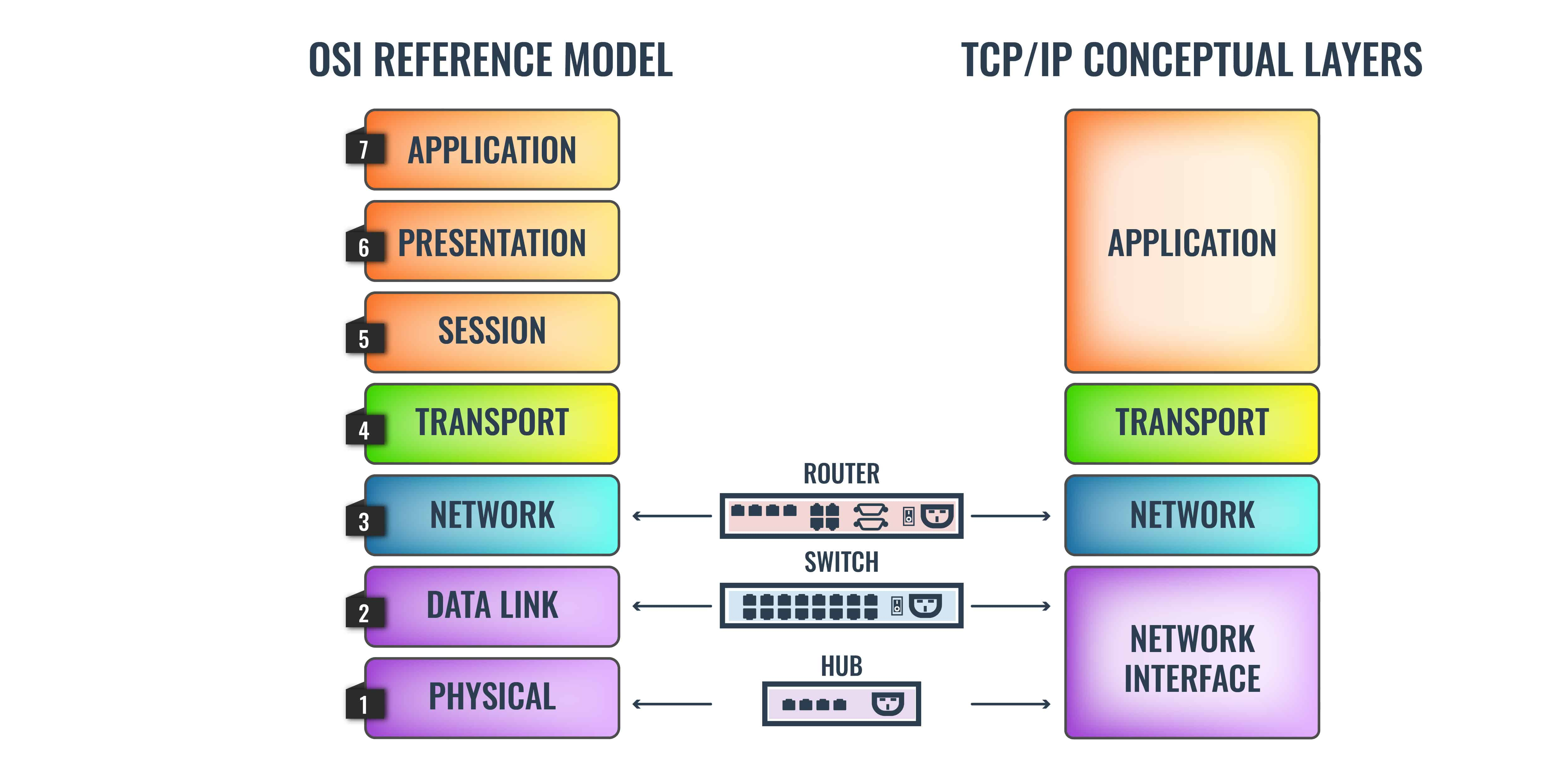
- Application Layer: It's the layer that user interacts with. This layer uses protocols like HTTP and FTP.
Presentation Layer : This layer prepares and translates data from the network format to the application format or vice versa.
Session Layer: It's the layer responsible for establishing, maintaining, and ending connections between different applications. Typically you’ll see protocols such as NetBios, NFS, RPC, and SQL operating on this layer.
Transport Layer: It is the layer responsible for transferring data between end systems and hosts. It dictates what gets sent where, and how much of it gets sent. At this level, you see protocols like TCP, UDP, and SPX.
Network Layer: It has the job of dealing with most of the routing within a network. In simple terms, the Network Layer determines how a packet travels to its destination. Protocols like TCP/IP, AppleTalk, and IPX operate at this layer.
Data Link Layer: The data link provides for the transfer of data frames between hosts connected to the physical link.
Physical Layer: It is the hardware layer of the OSI model which includes network elements such as hubs, cables, ethernet, and repeaters. For example, this layer is responsible for executing electrical signal changes like making lights light up.
HTTP messages
As mentioned above, HTTP operates in application layer i.e. the layer user directly interacts with. Some key points regarding this protocol:
- HTTP follows the classical client-server model. A client opens a connection to issue a request and then waits for the server to respond.
- HTTP is a stateless protocol i.e. each request has isolated and independent lifecycle. HTTP is not session-less though. For example, HTTP cookies allow the use of stateful sessions.
- HTTP, which is an application layer protocol, rides on top of TCP (Transmission Control Protocol): a transport layer protocol.
- HTTP is text based protocol i.e data transmission takes place using text format.
HTTP request/response anatomy
An HTTP request can consist of four parts:
- Request method
- URL
- Request headers
- Request body
These are the possible HTTP request methods:
- GET requests a specific resource in its entirety
- HEAD requests a specific resource without the body content
- POST adds content, messages, or data to a new page under an existing web resource
- PUT directly modifies an existing web resource or creates a new URI if need be
- DELETE gets rid of a specified resource
- TRACE shows users any changes or additions made to a web resource
- OPTIONS shows users which HTTP methods are available for a specific URL
- CONNECT converts the request connection to a transparent TCP/IP tunnel
- PATCH partially modifies a web resource
An HTTP request is just a series of lines of text that follow the HTTP protocol. A GET request might look like this:
GET /hello.txt HTTP/1.1
User-Agent: curl/7.63.0 libcurl/7.63.0 OpenSSL/1.1.l zlib/1.2.11
Host: www.example.com
Accept-Language: en
Once the server receives the request, It may respond with some data. A sample HTTP response would like this:
HTTP/1.1 200 OK
Date: Wed, 30 Jan 2019 12:14:39 GMT
Server: Apache
Last-Modified: Mon, 28 Jan 2019 11:17:01 GMT
Accept-Ranges: bytes
Content-Length: 12
Vary: Accept-Encoding
Content-Type: text/plain

Hello World!
HTTP and security concern
As stated earlier, HTTP uses text format for data transmission. The problem is this data is not encrypted, so it can be intercepted by third parties to gather data being passed between the two systems. This issue can be addressed using HTTPS.
What is HTTPS?
The S in HTTPS stands for "secure." HTTPS uses TLS (or SSL) to encrypt HTTP requests and responses, so in the example above, instead of the text, an attacker would see a bunch of seemingly random characters.
Instead of:
GET /hello.txt HTTP/1.1
User-Agent: curl/7.63.0 libcurl/7.63.0 OpenSSL/1.1.l zlib/1.2.11
Host: www.example.com
Accept-Language: en
The attacker would see something like:
t8Fw6T8UV81pQfyhDkhebbz7+oiwldr1j2gHBB3L3RFTRsQCpaSnSBZ78Vme+DpDVJPvZdZUZHpzbbcqmSW1+dkughdkhkuyi2u3gsJGSJHF/FNUjgH0BmVRWII6+T4MnDwmCMZUI/orxP3HGwYCSIvyzS3MpmmSe4iaWKCOHQ==
How TLS encrypts HTTP messages
TLS uses a technology called public key encryption. In a nutshell:
- There are two keys, a public key and a private key.
- The public key is shared with client devices via the server's SSL certificate.
- When a client opens a connection with a server, the two devices use the public and private key to agree on new keys, called session keys, to encrypt further communications between them.
- All HTTP requests and responses are then encrypted with these session keys, so that anyone who intercepts communications can only see a random string of characters, not the plaintext.
You can find a great article on encryption here if that interests you.
Evolution of HTTP
The protocol was developed by Tim Berners-Lee and his team between 1989-1991. The first version: HTTP/0.9 is also referred to as one line protocol. Only GET request type was supported back then. HTTP/0.9 was very limited and both browsers and servers quickly extended it to be more versatile, resulting in HTTP/1.0.
HTTP/1.0 brought in quite a few novelties. It introduced concepts of status code, multiple request methods(GET , HEAD, POST), request/response headers etc.
Lack of Persistence
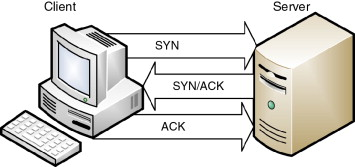
HTTP/1.0 required to open up a new TCP connection for each request (and close it immediately after the response was sent). TCP connection in turn uses a three-way handshake to establish a reliable connection. The connection is full duplex(two way connection), and both sides synchronize (SYN) and acknowledge (ACK) each other. The exchange of these four flags is performed in three steps—SYN, SYN-ACK, and ACK—as shown in Figure:
For better performance, it was crucial to reduce these round-trips between client and server. HTTP/1.1 solved this with persistent connections. What's a persistent connection? It's a (network communication) channel that remains open for further HTTP requests and responses rather than closing after a single exchange.
Keep-Alive header
keep-alive header was added to HTTP 1.0 to facilitate persistent connection. If the client supports keep-alive, it adds an additional header to the request:
Connection: keep-alive
Then, when the server receives this request and generates a response, it also adds a header to the response:
Connection: keep-alive
Following this, the connection is not dropped, but is instead kept open. When the client sends another request, it uses the same connection. This will continue until either the client or the server decides that the conversation is over, and one of them drops the connection.
HTTP/1.1
HTTP/1.1 Introduced critical performance optimizations and feature enhancements. Major offerings are listed below:
Persistent and pipelined connections
Persistence: In HTTP 1.1, all connections are considered persistent unless declared otherwise. The HTTP persistent connections do not use separate
keep-alivemessages, they just allow multiple requests to use a single connection by default.Pipelining: is the process of sending successive requests, over the same persistent connection, without waiting for the answer. This avoids latency of the connection.
The image below illustrates difference between short lived, persistent and pipelined connections.
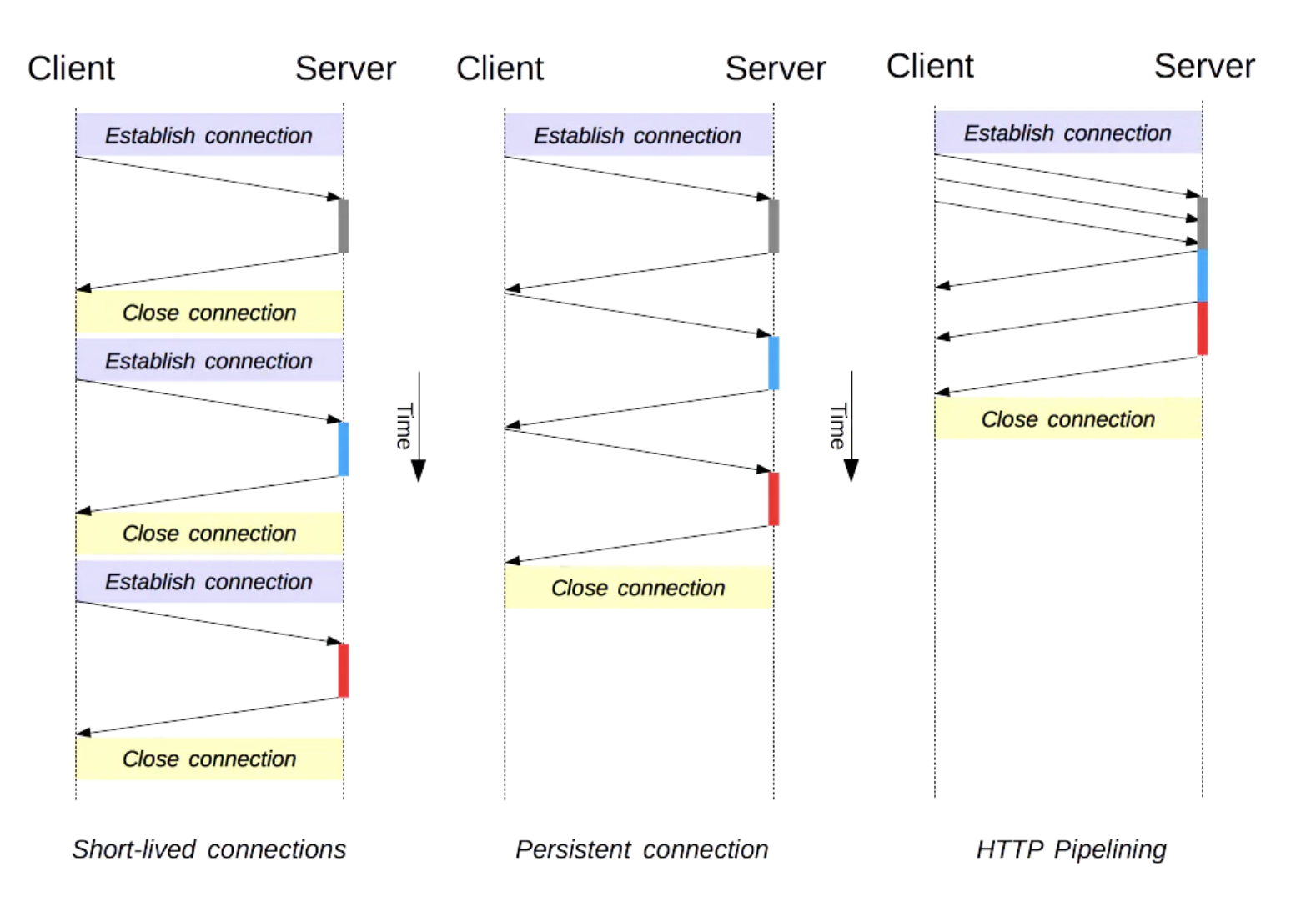
- Head of line blocking: Even though pipelining reduces number of requests and re-uses same connection, it still requires the responses to arrive in order. Which means if the first request takes too long to be responded, subsequent requests remain blocked. This is called "Head of line blocking". HTTP/2.0 sloves this using binary framing without sacrificing parallelism. More on this is discussed ahead in this article.
Chunked transfers encoding
keep-alive makes it difficult for the client to determine where one response ends and the next response begins, particularly during pipelined HTTP operation. This is a serious problem when Content-Length cannot be used due to streaming. To solve this problem, HTTP 1.1 introduced a chunked transfer coding that defines a last-chunk bit. The last-chunk bit is set at the end of each response so that the client knows where the next response begins.
Compression and Decompression
HTTP/1.1 introduced headers that allow transfer of compressed data over the network. It can be done with the help of Accept-Encoding and Content-Encoding headers. Here's summary of how it works:
- Client issues request with
Accept-Encodingheader to let server understand the compression schemes it supports:GET /encrypted-area HTTP/1.1 Host: www.example.com Accept-Encoding: gzip, deflate - If server supports any these compression schemes, it can choose to compress the content and respond with it along with
Content-Encodingheader:HTTP/1.1 200 OK Date: mon, 26 June 2016 22:38:34 GMT Server: Apache/1.3.3.7 (Unix) (Red-Hat/Linux) Last-Modified: Wed, 08 Jan 2003 23:11:55 GMT Accept-Ranges: bytes Content-Length: 438 Connection: close Content-Type: text/html; charset=UTF-8 Content-Encoding: gzip
HTTP/1.1 Also introduced following concepts:
- Virtual hosting: a server with a single IP Address hosting multiple domains
- Cache support: faster response and great bandwidth savings by adding cache support.
HTTP/2.0
HTTP/2 is a major revision of the HTTP protocol. It was derived from the earlier experimental SPDY protocol, originally developed by Google.
HTTP2 is binary, instead of textual
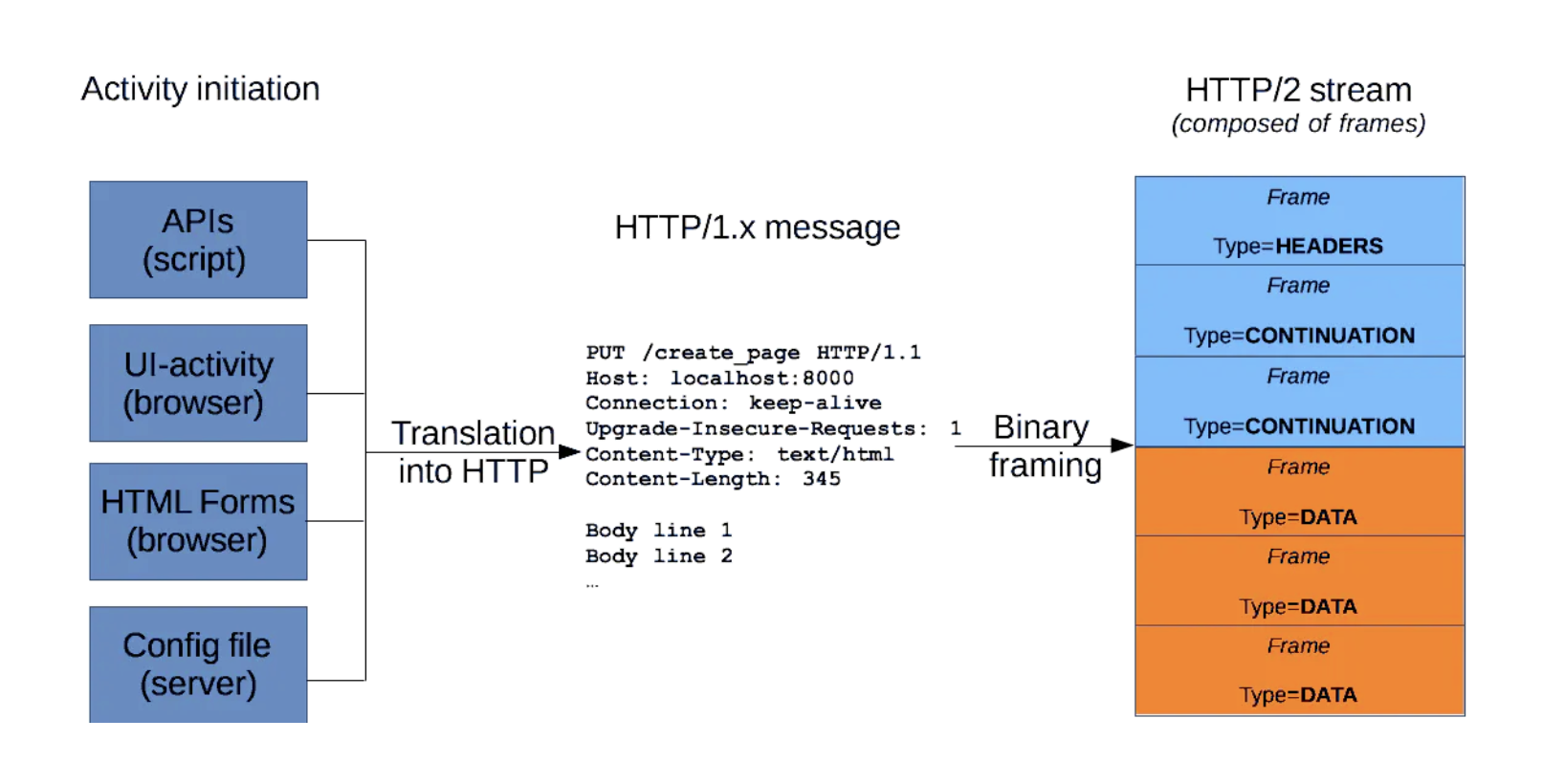
At the core of all performance enhancements of HTTP/2 is the new binary framing layer, which dictates how the HTTP messages are encapsulated and transferred between the client and server. Following are the critical terms associated with framing layer:
Frame: The smallest unit of communication in HTTP/2, each containing a frame header, which at a minimum identifies the stream to which the frame belongs.
Message: A complete sequence of frames that map to a logical request or response message.
Stream: A bidirectional flow of bytes within an established connection, which may carry one or more messages in it.
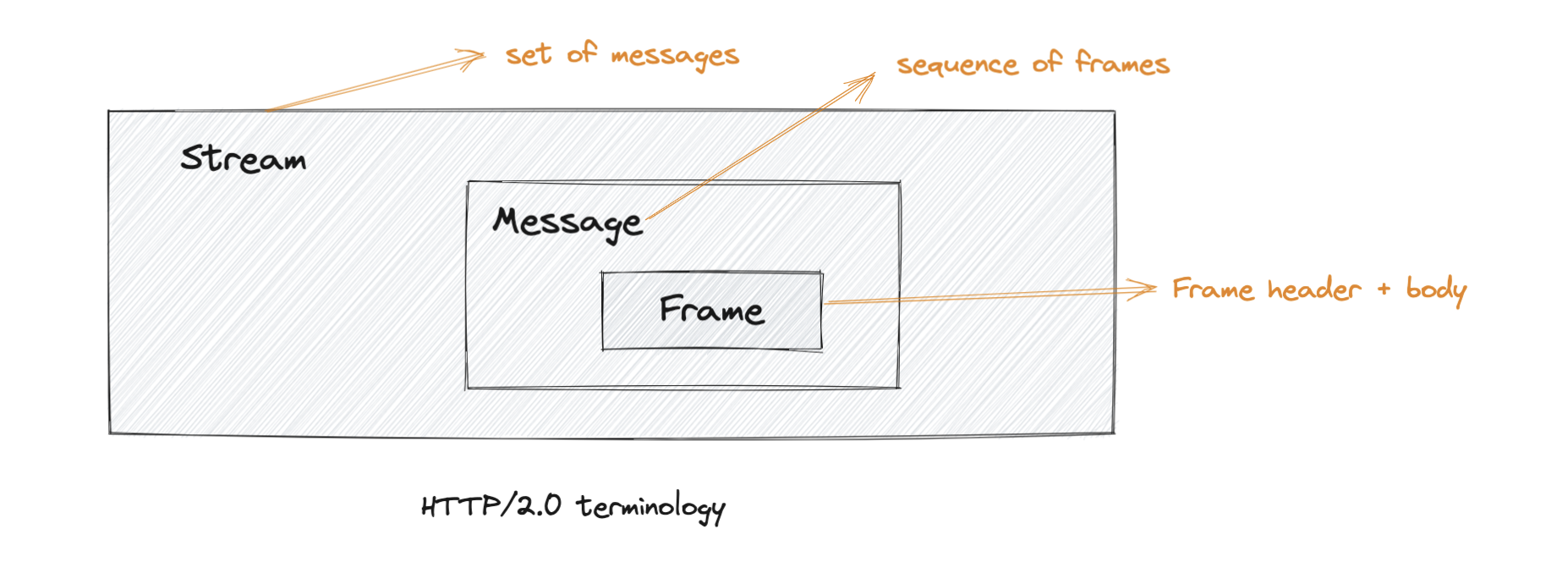
The image below illustrates how an HTTP/1.x message compares to HTTP/2.0 message (Source):
Multiplexing
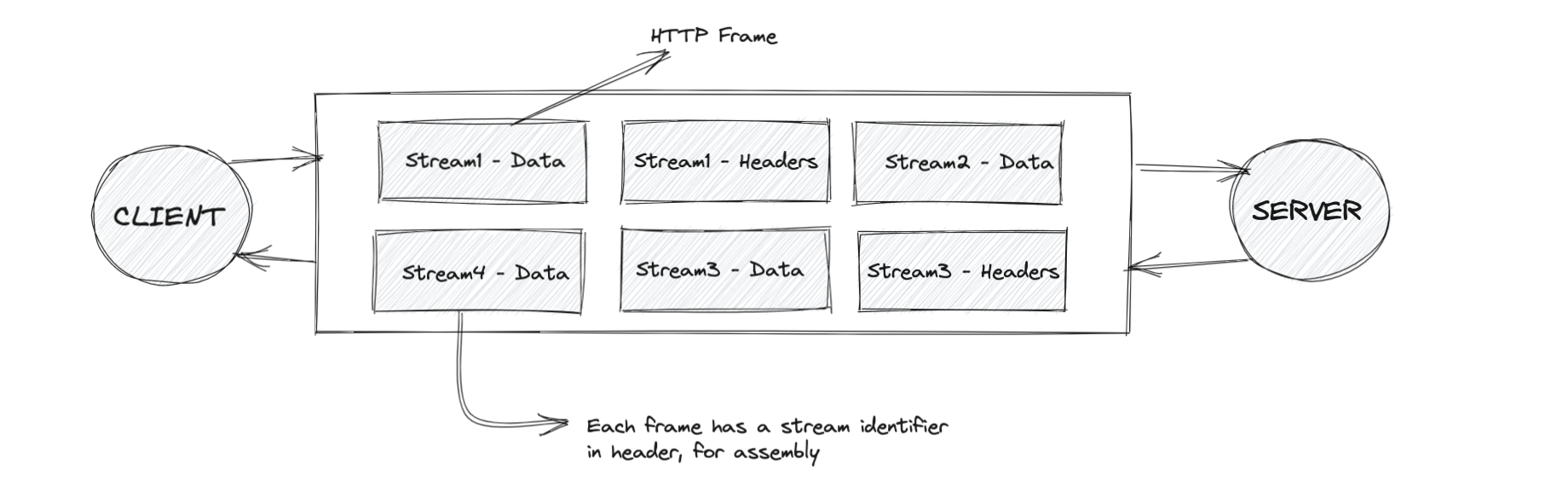
In HTTP/2.0, client and server can break down an HTTP message into independent frames, interleave them, and then reassemble them on the other end. This is called multiplexing. It can be understood better by the diagram below:
Parallelism: One connection per origin
With the new binary framing mechanism in place, HTTP/2 no longer needs multiple TCP connections to multiplex streams in parallel; each stream is split into many frames, which can be interleaved and prioritized. As a result, all HTTP/2 connections are persistent, and only one connection per origin is required, which offers numerous performance benefits.
Server push
Another powerful new feature of HTTP/2 is the ability of the server to send multiple responses for a single client request. That is, in addition to the response to the original request, the server can push additional resources to the client without the client having to request each one explicitly.
Server push is intended to be deprecated. More details on this post, shared by the chromium team.
Future of HTTP: HTTP/3.0
HTTP/3.0 is the upcoming major version of HTTP. So far the underlying transport layer mechanism behind HTTP has been TCP. HTTP/3.0 changes that, even though the core semantics remain unchanged.
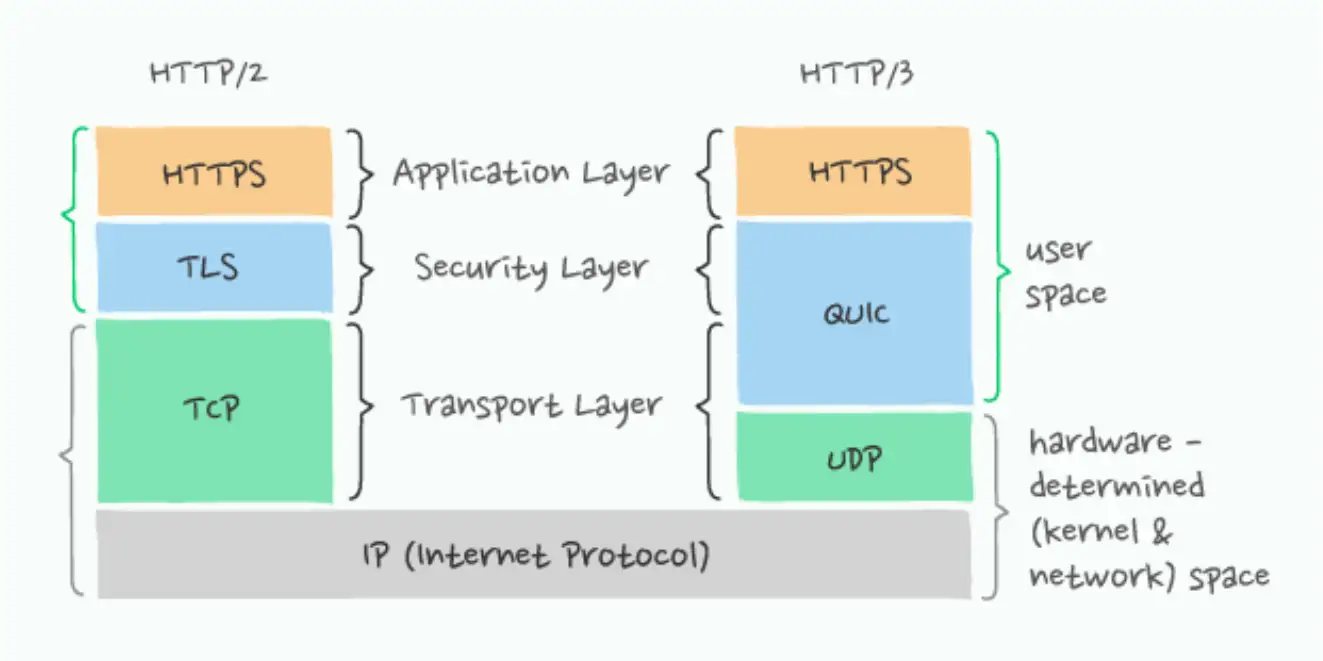
The fundamental difference between HTTP/2 and HTTP/3 is that HTTP/3 runs over QUIC, and QUIC runs over connectionless UDP instead of the connection-oriented TCP.
Another significant different is HTTP/3.0 mandates secure transfer of data. HTTP/3 includes encryption that borrows heavily from TLS but isn’t using it directly. This change is because HTTP/3 differs from HTTPS/TLS in terms of what it encrypts:
- With the older HTTPS/TLS protocol, only the data itself is protected by TLS, leaving a lot of the transport metadata visible.
- In HTTP/3 both the data and the transport protocol are protected.
Note: Most browsers do not support h2c (HTTP/2 without TLS), which means opting for HTTP/2.0 pretty much needs you to opt for TLS if you're hosting a website. Here's a relevant stackoverlow thread on why browsers act this way.
The diagram below illustrates fundamental difference between HTTP/3.0 and it's predecessor(source):
References:
- https://www.developer.mozilla.org/en-US/docs/Web/HTTP/Connection_management_in_HTTP_1.x
- https://www.en.wikipedia.org/wiki/HTTP_compression
- https://www.greenlanemarketing.com/resources/articles/seo-101-http-vs-http2/
- https://developers.google.com/web/fundamentals/performance/http2
- https://developer.mozilla.org/en-US/docs/Web/HTTP/Messages
- https://developer.okta.com/books/api-security/tls/how/
.
Comments
Join the discussionNo comments yet. Be the first to comment.


