

Tree data structure in JavaScript
Implementation and traversal techniques

Tree is an interesting data structure. It has wide variety of applications in all sorts of fields. For example:
DOM is a tree data structure
Directory and files in our OS can be represented as trees
A family hierarchy can be represented as a tree.
There are bunch of variations of tree (such as heaps, BST etc.) which can be used in solving problems related to scheduling, image processing, databases etc. Many of complex problems may not seem related to tree on a quick look, but can actually be represented as one. We'll walk through such problems as well (in later parts of this series) to see how trees can make seemingly complex problems much easier to comprehend and solve.
Don't forget to subscribe to my newsletter (subscription form should be at the top of this article) if you'd like to be informed about further posts in this series.
Introduction
Implementing a Node for a binary tree is pretty straightforward.
function Node(value){
  this.value = value
  this.left = null
  this.right = null
}
// usage
const root = new Node(2)
root.left = new Node(1)
root.right = new Node(3)
So these few lines of code would create a binary tree for us which looks like this:
           2
        /      \
       /         \
     1            3
   /   \        /    \
null  null   null   null
Cool! So that was easy. Now, how do we put this to use?
Traversal
Let's start with trying to walk through these connected tree nodes (or a tree). Just as we can iterate through an array, it would be cool if we can 'iterate' through tree nodes as well. However, trees are not linear data structures like arrays, so there isn't just one way of traversing these. We can broadly classify the traversal approaches into following:
Breadth first traversal
Depth first traversal
Breadth First Search/Traversal (BFS)
In this approach, we traverse the tree level by level. We would start at the root, then cover all of it's children, and we cover all of 2nd level children, so on and so forth. For example for the tree above, traversal would result in something like this:
2, 1, 3
Here's an illustration with slightly complex tree to make this even simpler to understand:
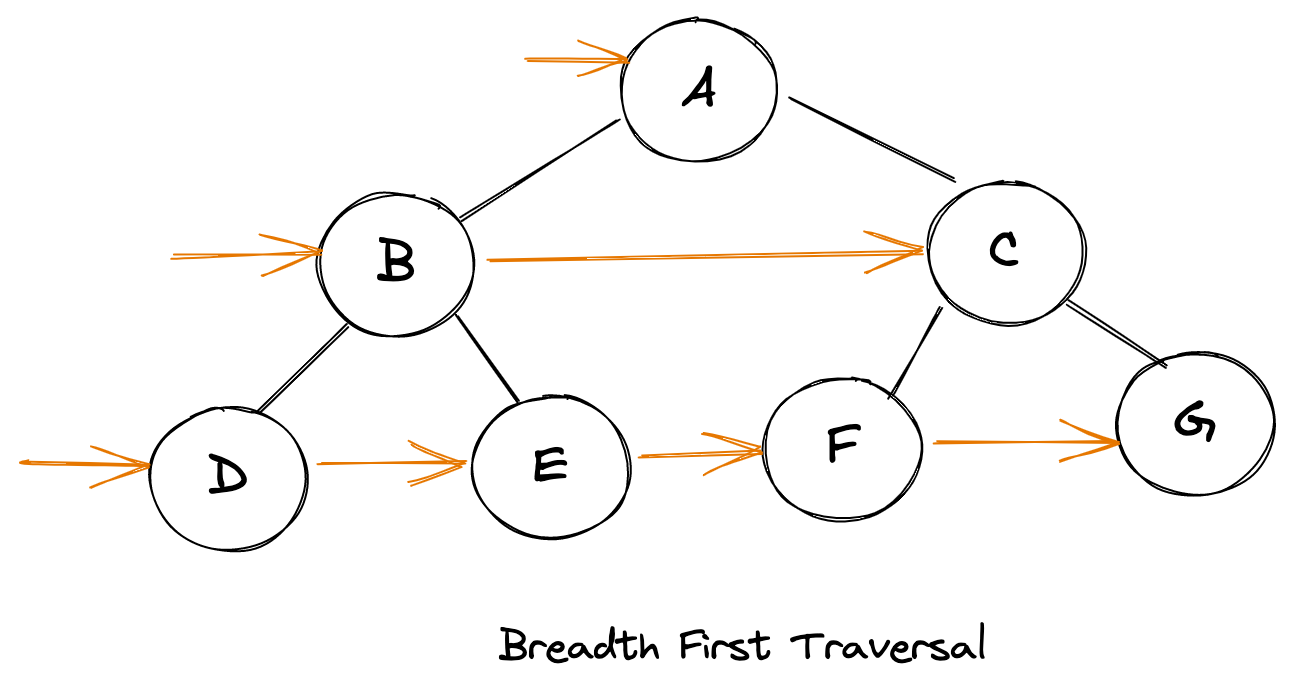
To achieve this form of traversal we can use a queue (First In First Out) data structure. Here's how the overall algorithm would look like:
Initiate a queue with root in it
Remove the first item out of queue
Push the left and right children of popped item into the queue
Repeat steps 2 and 3 until the queue is empty
Here's how this algorithm would look like post implementation:
function walkBFS(root){
  if(root === null) return

  const queue = [root]
  while(queue.length){
      const item = queue.shift()
      // do something
      console.log(item)

      if(item.left) queue.push(item.left)
      if(item.right) queue.push(item.right)
   }
}
We can modify above algorithm slightly to return an array of arrays, where each inner array represents a level with elements within in:
function walkBFS(root){
  if(root === null) return

  const queue = [root], ans = []

  while(queue.length){
      const len = queue.length, level = []
      for(let i = 0; i < len; i++){
          const item = queue.shift()
          level.push(item)
          if(item.left) queue.push(item.left)
          if(item.right) queue.push(item.right)
       }
       ans.push(level)
   }
  return ans
}
Depth First Search/Traversal (DFS)
In DFS, we take one node and keep exploring it's children until the depth the fully exhausted. It can be done in one of following ways:
 root node -> left node -> right node // pre-order traversal
 left node -> root node -> right node // in-order traversal
 left node -> right node -> root node // post-order traversal
All of these traversal techniques can be implemented recursively as well as iteratively. Let's jump into the implementation details:
Pre-Order traversal
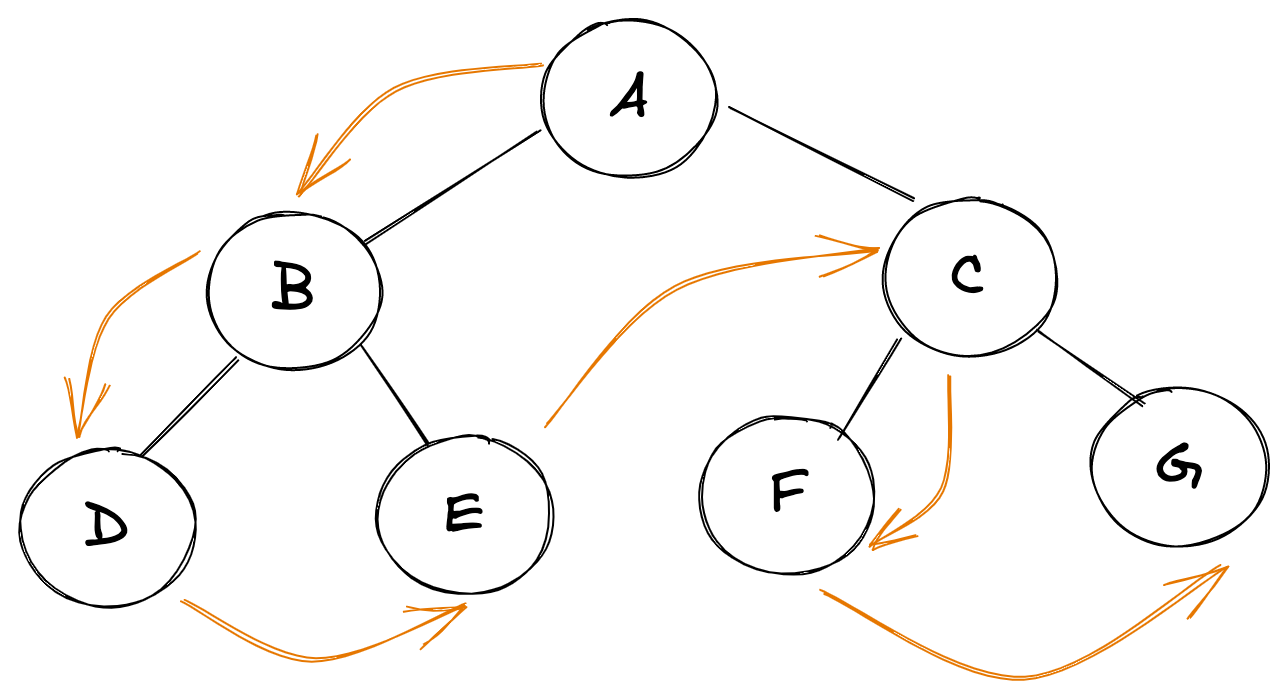
Here's how PreOrder traversal looks like for a tree:
root node -> left node -> right node
Trick:
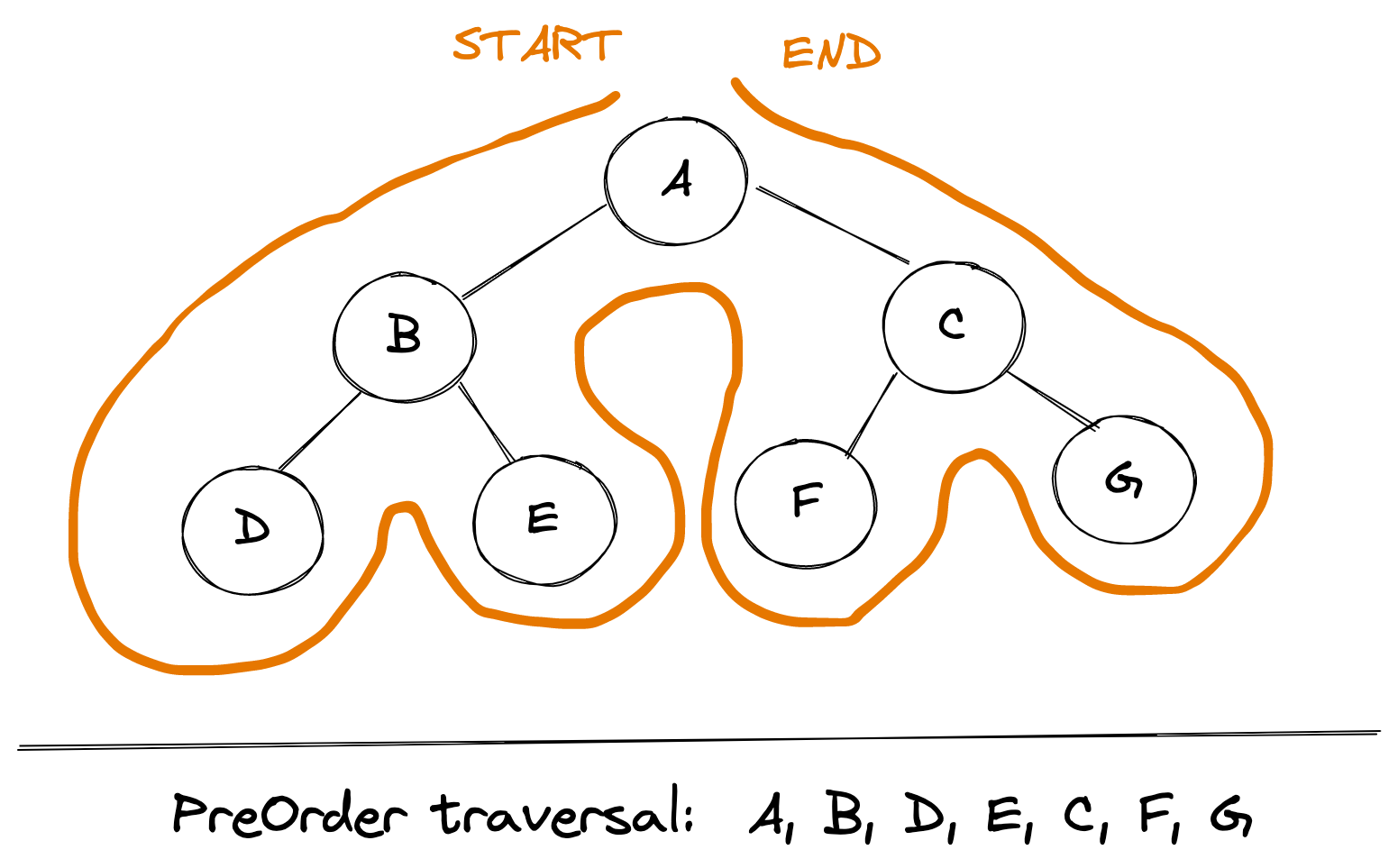
We can use this simple trick to find out the PreOrder traversal of any tree manually: traverse the entire tree starting from the root node keeping yourself to the left.
Implementation:
Let's dive into actual implementation for such a traversal. Recursive approach is fairly intuitive.
function walkPreOrder(root){
  if(root === null) return

  // do something here
  console.log(root.val)

  // recurse through child nodes
  if(root.left) walkPreOrder(root.left)
  if(root.right) walkPreOrder(root.right)
}
Iterative approach for PreOrder traversal is very similar to BFS, except we use a stack instead of a queue and we push the right child first into the stack:
function walkPreOrder(root){
  if(root === null) return

  const stack = [root]
  while(stack.length){
      const item = stack.pop()

      // do something
      console.log(item)

      // Left child is pushed after right one, since we want to print left child first hence it must be above right child in the stack
      if(item.right) stack.push(item.right)
      if(item.left) stack.push(item.left)
   }
}
In-Order traversal
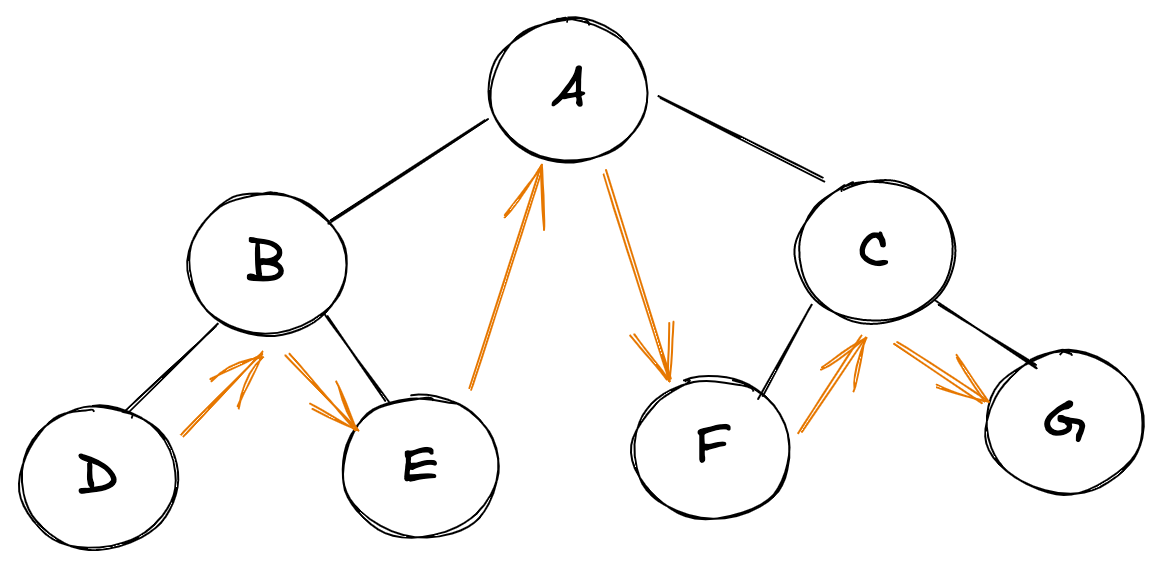
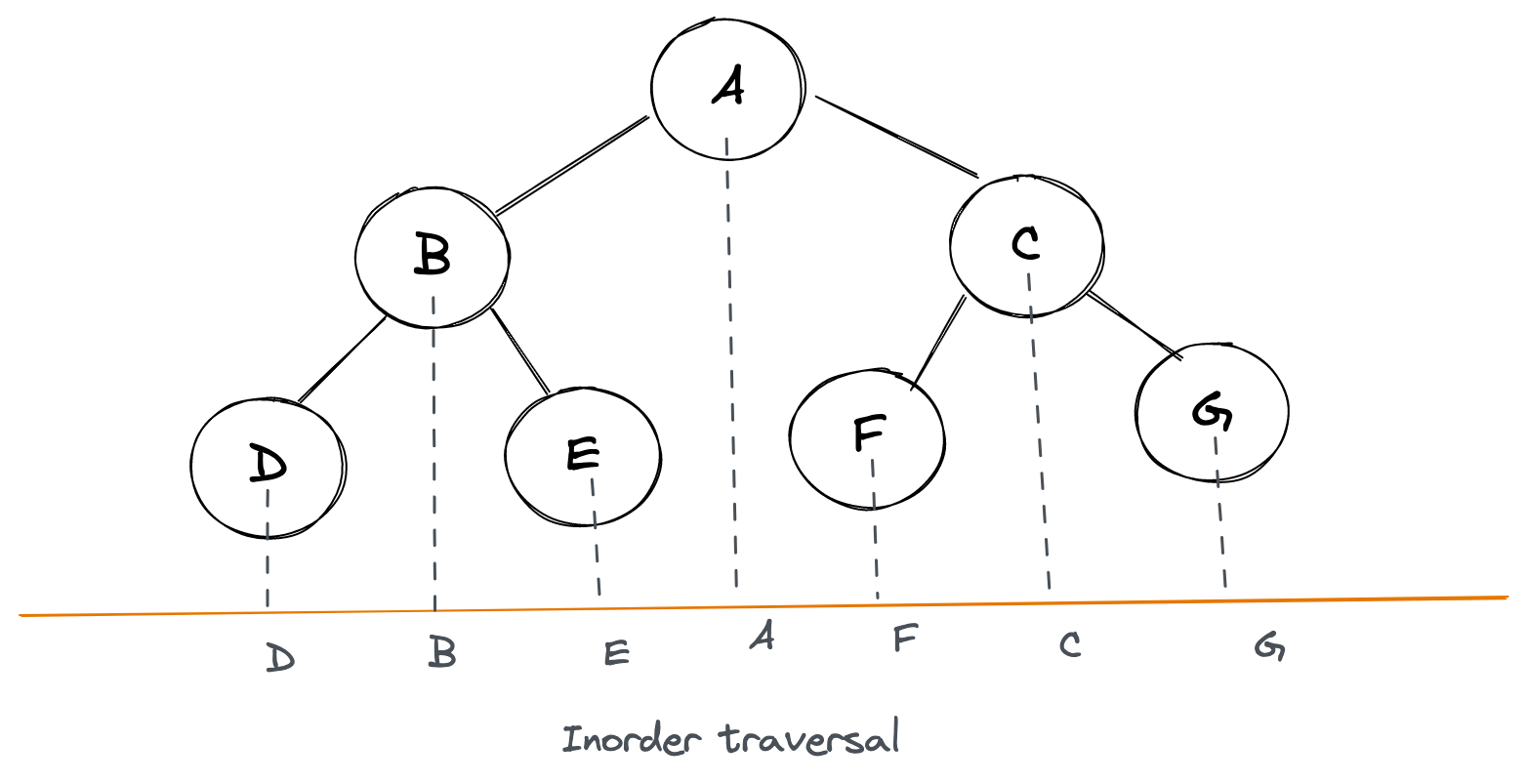
Here's how InOrder traversal looks like for a tree:
left node -> root node -> right node
Trick:
We can use this simple trick to find out InOrder traversal of any tree manually: keep a plane mirror horizontally at the bottom of the tree and take the projection of all the nodes.
Implementation:
Recursive:
function walkInOrder(root){
  if(root === null) return

  if(root.left) walkInOrder(root.left)

 // do something here
  console.log(root.val)

  if(root.right) walkInOrder(root.right)
}
Iterative: This algorithm may seem a bit cryptic at first. But it's fairly intuitive. Let's look at it this way: in InOrder traversal left most child is printed first, then root and then right children. So first thought would be to come up with something like this:
const curr = root

while(curr){
  while(curr.left){
    curr = curr.left // get to leftmost child
  }

  console.log(curr) // print it

  curr = curr.right // now move to right child
}
In the above approach we're not able to backtrack however i.e. go back to parent nodes which led to left most nodes. So we'll need a stack to record those. Hence our revised approach may look like:
const stack = []
const curr = root

while(stack.length || curr){
  while(curr){
    stack.push(curr) // keep recording the trail, to backtrack
    curr = curr.left // get to leftmost child
  }
  const leftMost = stack.pop()
  console.log(leftMost) // print it

  curr = leftMost.right // now move to right child
}
Now we can use the above approach to lay down the final iterative algorithm:
function walkInOrder(root){
  if(root === null) return

  const stack = []
  let current = root

  while(stack.length || current){
      while(current){
         stack.push(current)
         current = current.left
      }
      const last = stack.pop()

      // do something
      console.log(last)

      current = last.right
   }
}
Post-Order traversal
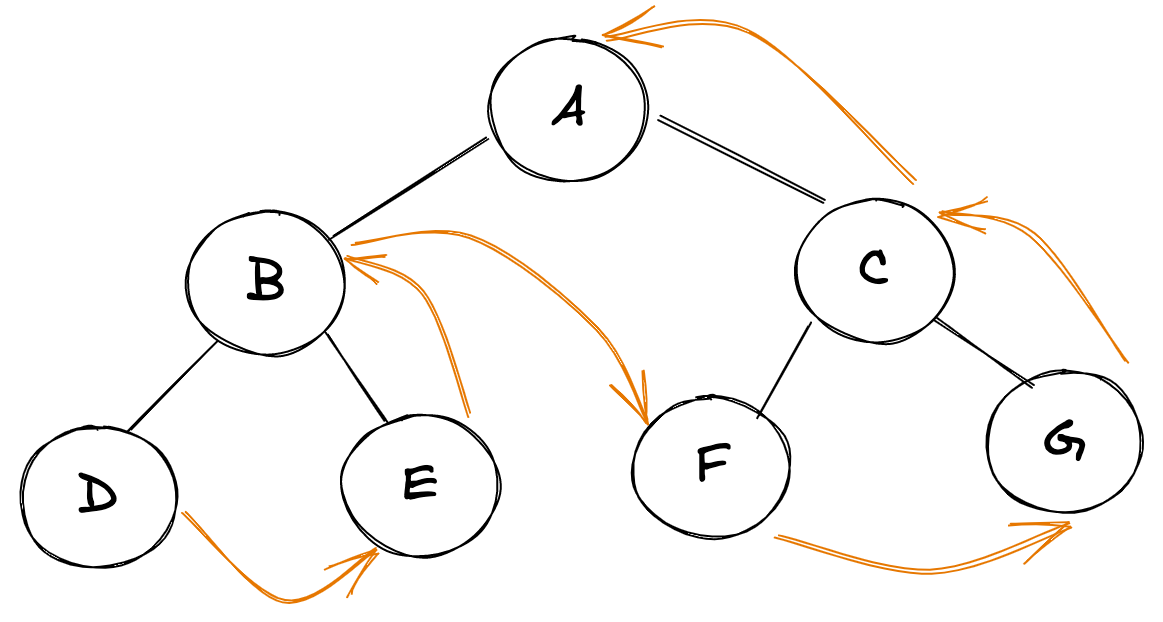
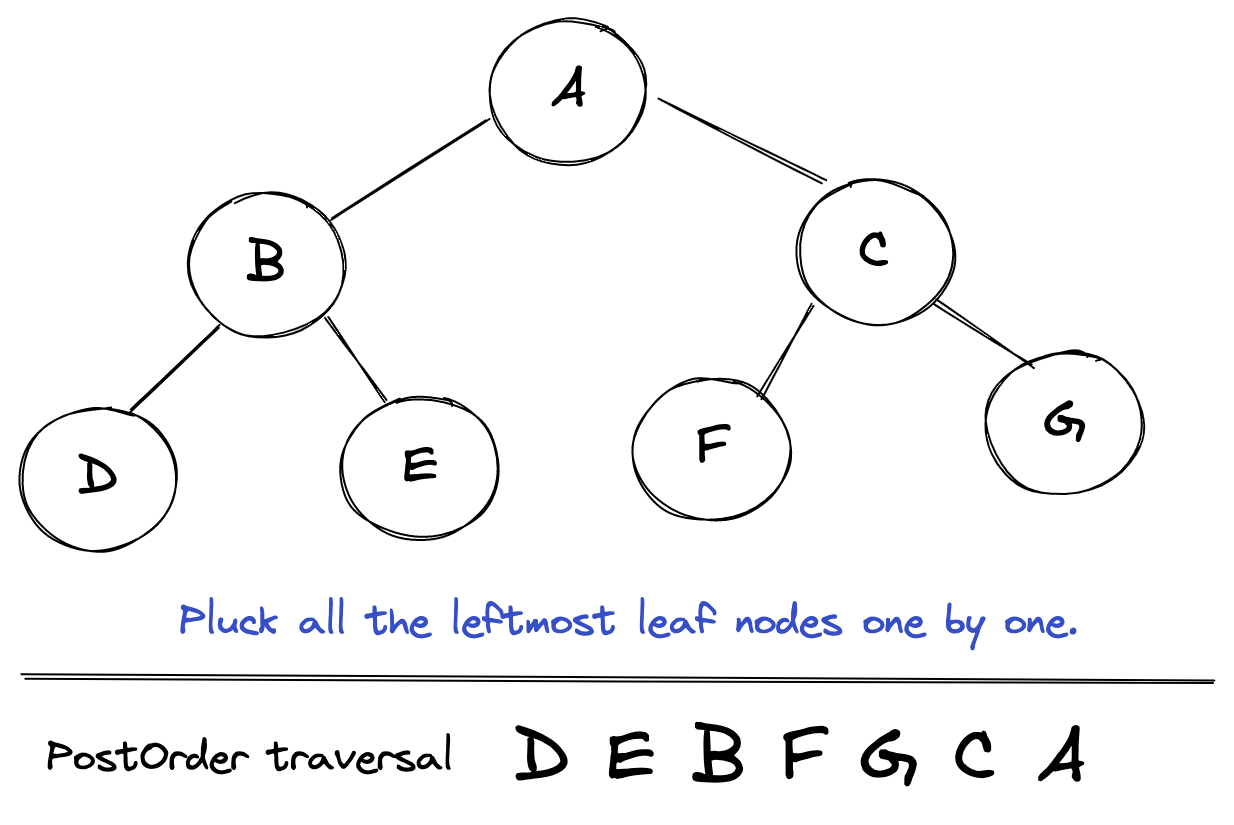
Here's how postOrder traversal looks like for a tree:
left node -> right node -> root node
Trick:
For quick manual PostOrder traversal of any tree: pluck all the leftmost leaf nodes one by one.
Implementation:
Let's dive into actual implementation for such a traversal.
Recursive:
function walkPostOrder(root){
  if(root === null) return

  if(root.left) walkPostOrder(root.left)
  if(root.right) walkPostOrder(root.right)

  // do something here
  console.log(root.val)

}
Iterative: We already have iterative algorithm for preOrder traversal. Can we use that? Since PostOrder traversal seems to be just reverse of PreOrder traversal. Let's see:
// PreOrder:
root -> left -> right

// Reverse of PreOrder:
right -> left -> root

// But PostOrder is:
left -> right -> root
Ah! So there's a slight difference. But we can accomodate that by modifying our PreOrder algorithm slightly and then reversing it should give the PostOrder results. Overall algorithm would be:
// record result using
root -> right -> left

// reverse result
left -> right -> root
Use a similar approach to the iterative preOrder algorithm above, using a temporary
stack.- Only exception is we go
root -> right -> leftinstead ofroot -> left -> right
- Only exception is we go
Keep recording the traversal sequence in an array
resultReversal of
resultgives postOrder traversal
function walkPostOrder(root){
  if(root === null) return []

  const tempStack = [root], result = []

  while(tempStack.length){
      const last = tempStack.pop()

      result.push(last)

      if(last.left) tempStack.push(last.left)
      if(last.right) tempStack.push(last.right)
    }

    return result.reverse()
}
Bonus: JavaScript tip
How nice it would be if we could traverse the tree in the following way:
 for(let node of walkPreOrder(tree) ){
   console.log(node)
 }
Looks really nice and pretty simple to read, isn't it? All we've got to do is use a walk function, which would return an iterator.
Here's how we can modify our walkPreOrder function above to behave as per the example shared above:
function* walkPreOrder(root){
   if(root === null) return

  const stack = [root]
  while(stack.length){
      const item = stack.pop()
      yield item
      if(item.right) stack.push(item.right)
      if(item.left) stack.push(item.left)
   }
}
Comments
Join the discussionWhat's amazing article, very clear and helpful !!!
Very good article and it's very clear for understanding. Thank you Anish.
Thanks. Not sure what do you mean by reprint? Do you mean posting it on blog?
Yes, I'm in China. Anish Kumar
Sure. stark
Great article, Thanks for sharing Anish Kumar.
One correction in “In order traversal” section it should be left -> root -> right
Thanks for pointing out. Corrected.
A very good article. Thanks for sharing Anish Kumar. Keep them coming. Welcome to Hashnode btw :)
Glad that you found it useful!


